NoSQL: Overview
Data Science 310
Boston University
The Rise of NoSQL
- Beginning in the early 2000s, web-based applications increasingly needed to deal with massive amounts of:
- data
- traffic / queries
- Scalability is crucial.
- load can increase rapidly and unpredictably
- Large servers are expensive and can only grow so large.
- Solution: use clusters of small commodity machines
- use both fragmentation/sharding and replication
- cheaper
- greater overall reliability
- can take advantage of cloud-based storage
The Rise of NoSQL (cont.)
- Problem: Relational DBMSs do not scale well to large clusters.
- Google and Amazon each developed their own alternative approaches to data management on clusters.
- Google: BigTable
- Amazon: DynamoDB
- The papers that Google and Amazon published about their efforts got others interested in developing similar DBMSs.
➔ noSQL
What Does NoSQL Mean?
- Not well defined.
- Typical characteristics of NoSQL DBMSs:
- don’t use SQL / the relational model
- open-source
- designed for use on clusters
- support for sharding/fragmentation and replication
- schema-less or flexible schema
- One good overview:
Sadalage and Fowler, NoSQL Distilled
(Addison-Wesley, 2013).
Flavors of NoSQL
- Various taxonomies have been proposed
- Three of the main classes of NoSQL databases are:
- key-value stores
- document databases
- column-family (aka big-table) stores
- Some people also include graph databases.
- very different than the others
- they are not designed for clusters
Key-Value Stores
- Simple data model: key/value pairs
- the DBMS does not attempt to interpret the value
- Queries are limited to query by key.
- get/put/update/delete a key/value pair
- iterate over key/value pairs
Document Databases
- Also store key/value pairs
- Unlike key-value stores, the value is not opaque.
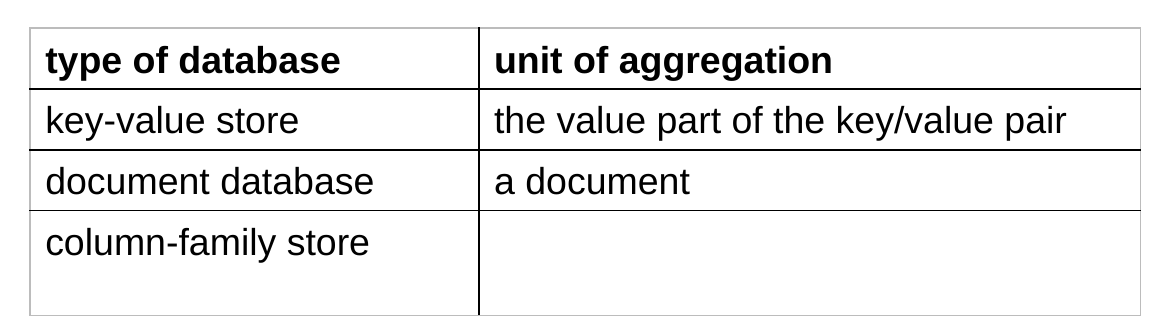
- it is a document containing semistructured data
- it can be examined and used by the DBMS
- Queries:
- can be based on the key (as in key/value stores)
- more often, are based on the contents of the document
- Here again, there is support for sharding and replication.
- the sharding can be based on values within the document
Column-Family Databases
- Google’s BigTable and systems based on it
- To understand the motivation behind their design, consider one type of problem BigTable was designed to solve:
- You want to store info about web pages!
- For each URL, you want to store:
- its contents
- its language
- for each other page that links to it, the anchor text associated with the link (i.e., the text that you click on)
Storing Web-Page Data in a Traditional Table
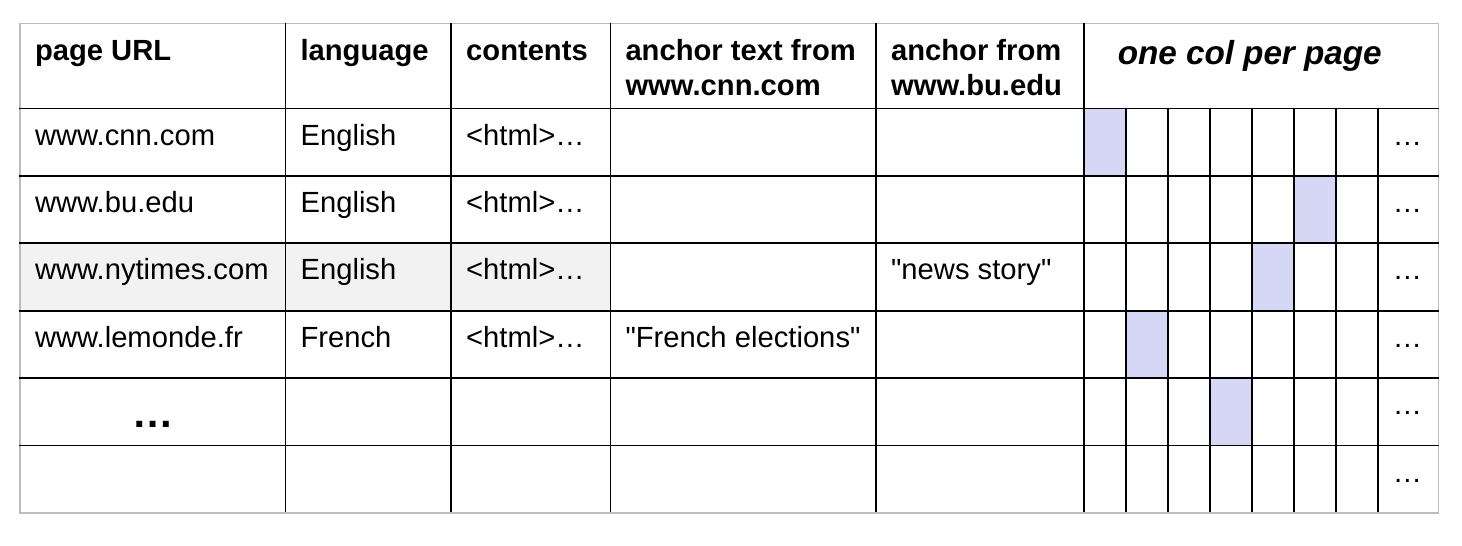
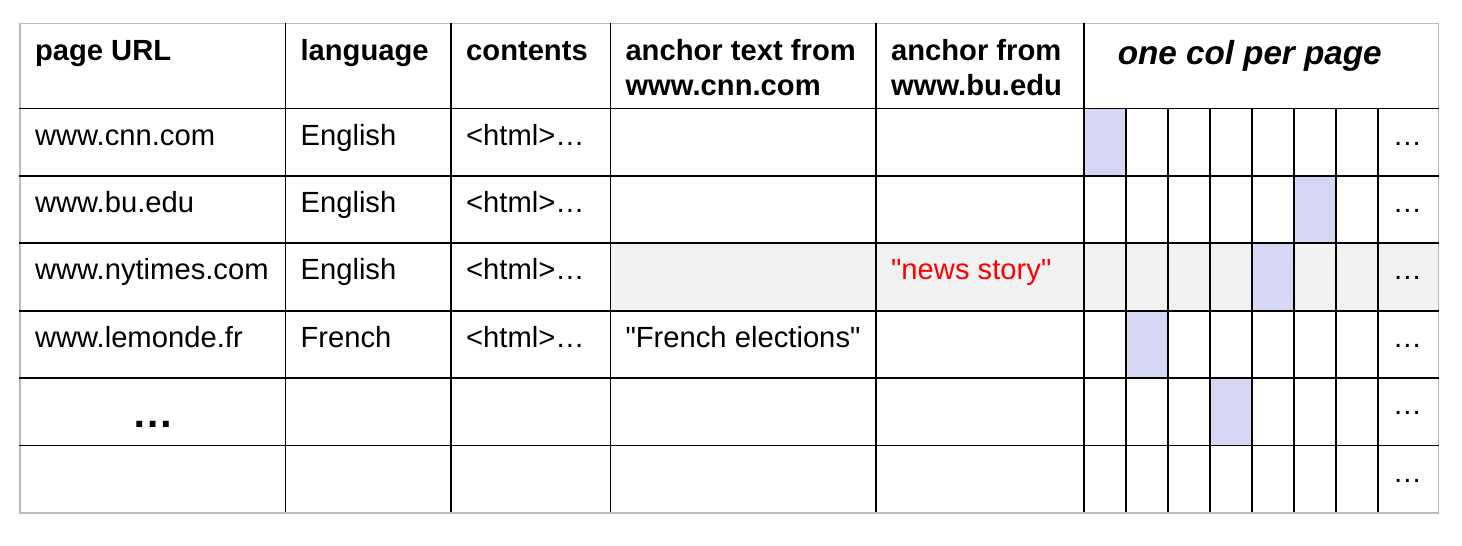
- One row per web page
- Single columns for its language and contents
- One column for the anchor text from each possible page, since in theory any page could link to any other page!
- Leads to a huge sparse table – most cells are empty/unused.
Storing Web-Page Data in BigTable
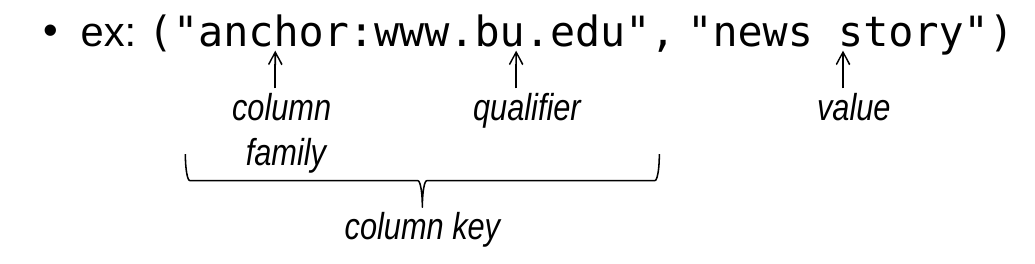
- Rather than defining all possible columns, define a set of column families that each row should have.
- example: a column family called anchor that replaces all of the separate anchor columns on the last slide
- can also have column families that are like typical columns
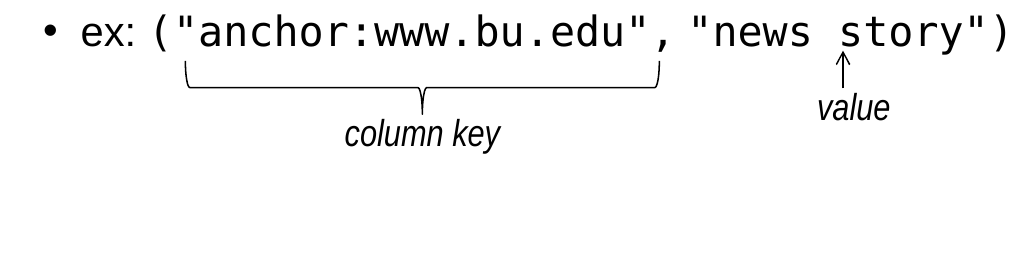
- In a given row, only store columns with an actual value, representing them as (column key, value) pairs
- column key = column family:qualifier
Data Model for Column-Family Databases
- Different rows can have different schema.
- i.e., different sets of column keys
- (column key, value) pairs can be added or removed from a given row over time
- The set of column families in a given table rarely change.
Aggregate Orientation
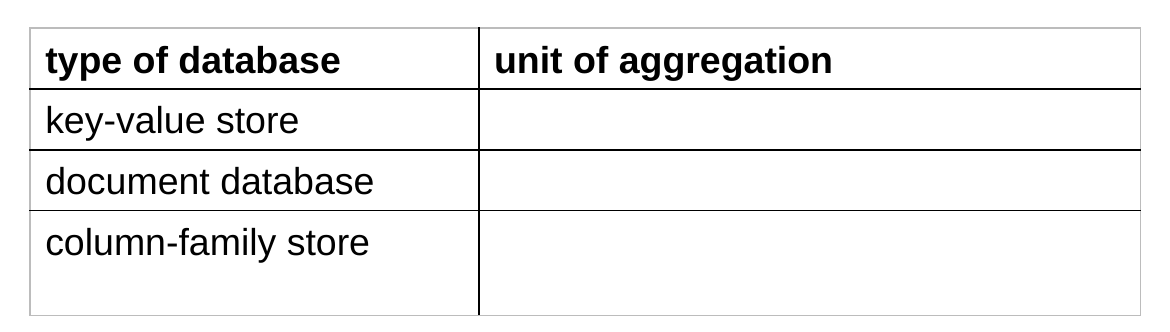
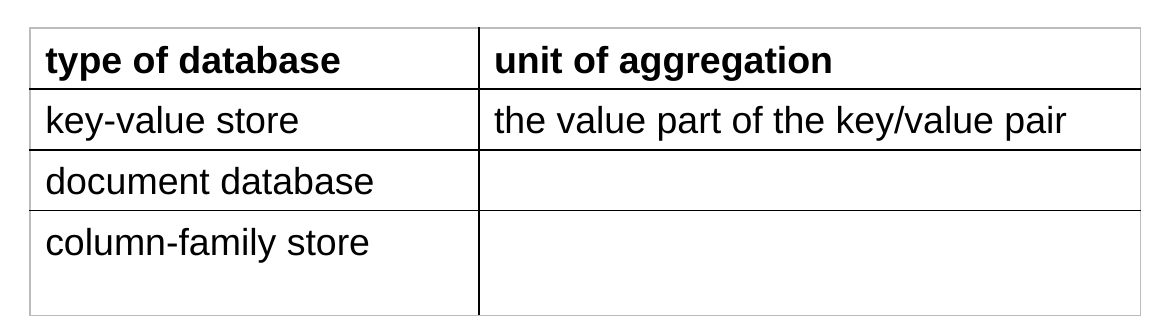
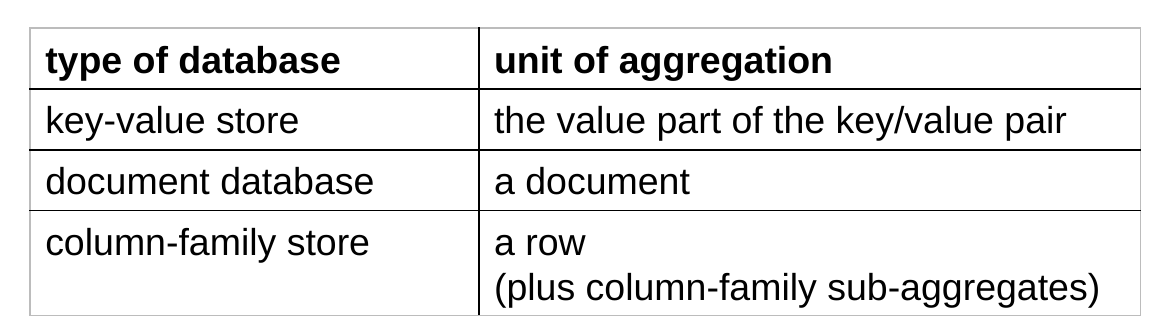
- Key-value, document, and column-family stores all lend themselves to an aggregate-oriented approach.
- group together data that “belongs” together
- i.e., that will tend to be accessed together
- group together data that “belongs” together
- Relational databases can’t fully support aggregation.
- no multi-valued attributes; focus on avoiding duplicated data
- give each type of entity its own table, rather than grouping together entities/attributes that are accessed together
Aggregate Orientation (cont.)
- Example: data about customers
- RDBMS: store a customer’s address in only one table
- use foreign keys in other tables that refer to the address
- aggregate-oriented system: store the full customer address in several places:
- customer aggregates
- order aggregates
- etc.
- RDBMS: store a customer’s address in only one table
- Benefits of an aggregate-based approach in a NoSQL store:
- provides a unit for sharding across the cluster
- allows us to get related data without needing to access many different nodes
Schemalessness
- NoSQL systems are completely or mostly schemaless.
- Key-value stores: put whatever you like in the value
- Document databases: no restrictions on the schema used by the semistructured data inside each document.
- although some do allow a schema
- Column-family databases:
- we do specify the column families in a given table
- but no restrictions on the columns in a given column family and different rows can have different columns
Schemalessness (cont.)
- Advantages:
- allows the types of data that are stored to evolve over time
- makes it easier to handle nonuniform data
- e.g., sparse tables
- Despite the fact that a schema is not required, programs that use the data need at least an implicit schema.
- Disadvantages of an implicit schema:
- the DBMS can’t enforce it
- the DBMS can’t use it to try to make accesses more efficient
- different programs that access the same database can have conflicting notions of the schema
Example Document Database: MongoDB
- Mongo (from humongous)
- Key features include:
- replication for high availability
- auto-sharding for scalability
- documents are expressed using JSON/BSON
- queries can be based on the contents of the documents
- Related documents are grouped together into collections.
- MongoDB is open-source and free to use.
JSON
- JSON is an alternative data model for semistructured data.
- JavaScript Object Notation
- Built on two key structures:
- an object, which is a sequence of fields (name:value pairs)
- an array of values
- A value can be:
- an atomic value: string, number, true, false, null
- an object
- an array
Example: JSON Object for a Person
- fields with atomic values:
firstName,lastName,age
- a field whose value is an embedded object:
address
- a field whose value is an array of embedded objects:
phoneNumbers
BSON
- MongoDB actually uses BSON.
- a binary representation of JSON
- BSON = marshalled JSON!
- BSON includes some additional types that are not part of JSON.
- in particular, a type called ObjectID for unique id values.
- Each MongoDB document is a BSON object.
The _id Field
- Every MongoDB document must have an
_idfield.- its value must be unique within the collection
- acts as the primary key of the collection
- it is the key in the key/value pair
- If you create a document without an
_idfield:- MongoDB adds the field for you
- assigns it a unique BSON ObjectID
MongoDB Terminology
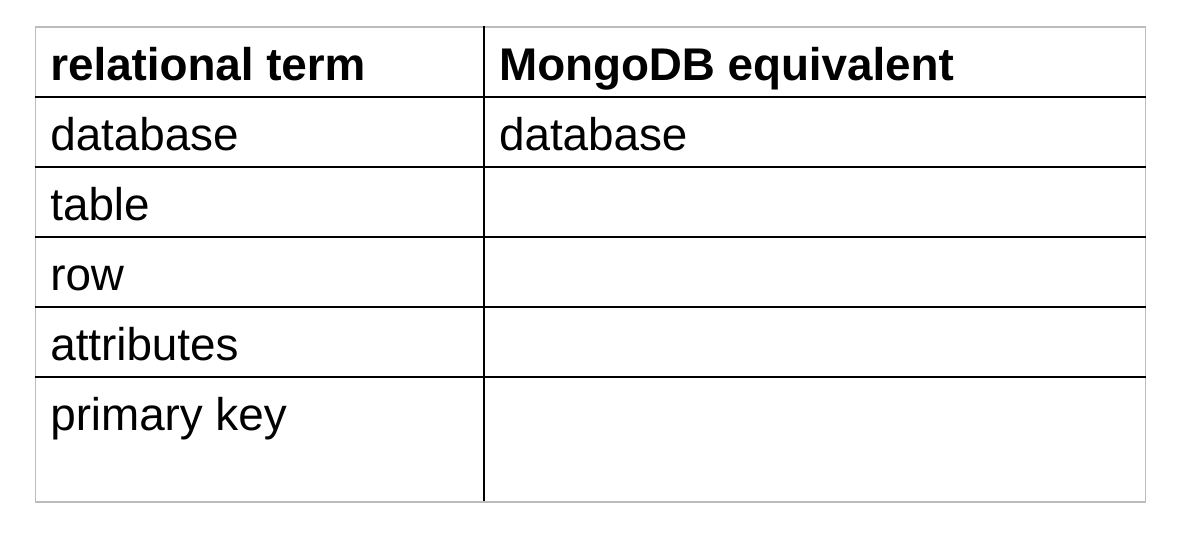
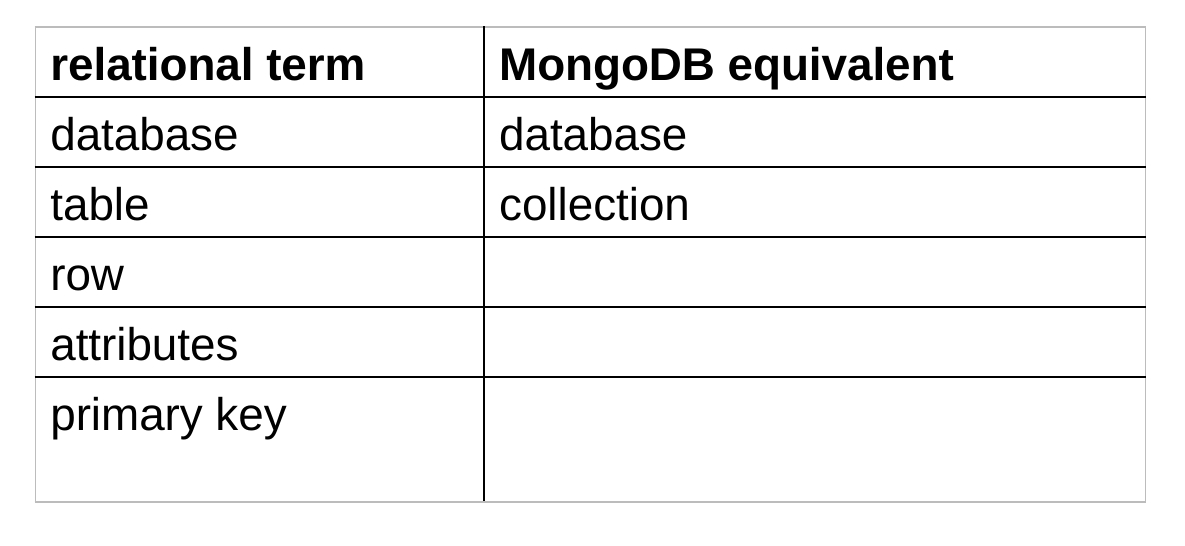
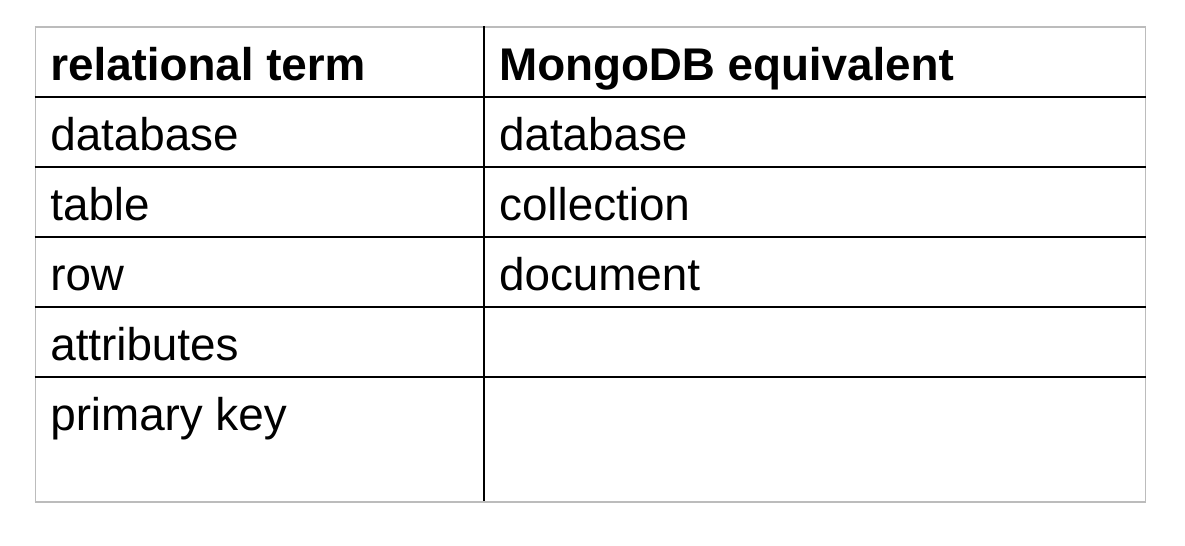
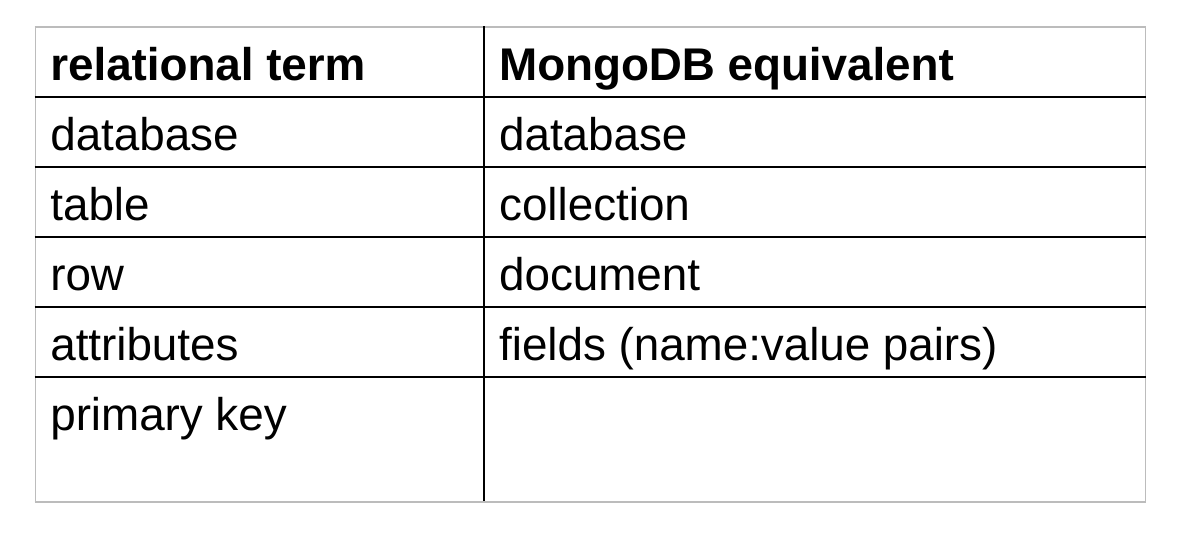
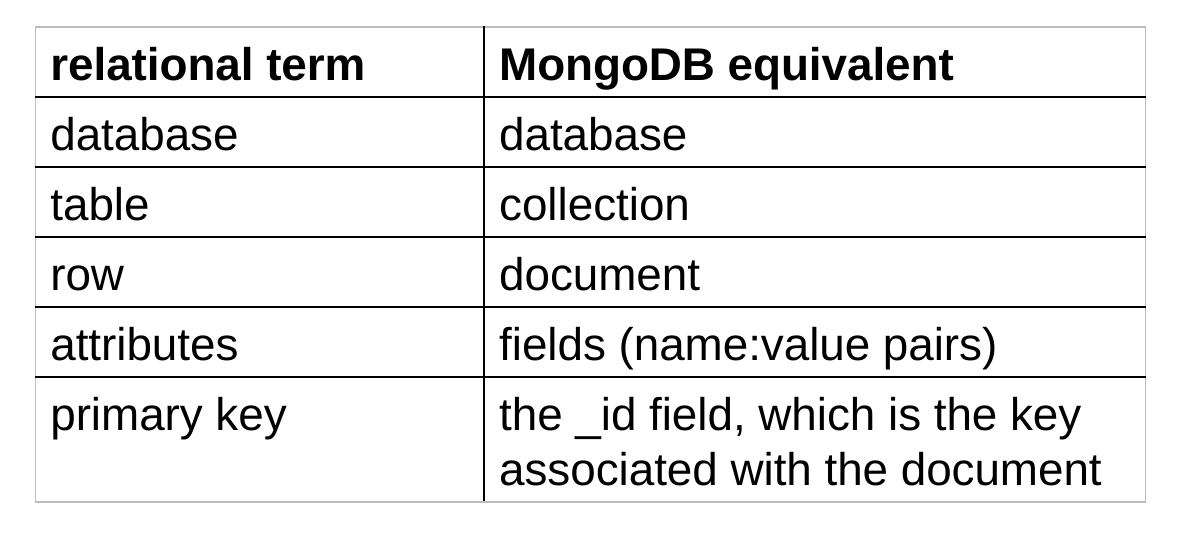
- Documents in a given collection typically have a similar purpose.
- However, no schema is enforced.
- different documents in the same collection can have different fields
Data Modeling in MongoDB
- Need to determine how to map
entities and relationships ➔ collections of documents - Could in theory give each type of entity:
- its own (flexibly formatted) type of document
- those documents would be stored in the same collection
- However, recall that NoSQL models allow for aggregates in which different types of entities are grouped together.
- Determining what the aggregates should look like involves deciding how we want to represent relationships.
Capturing Relationships in MongoDB
- Two options:
- store references to other documents using their
_idvalues
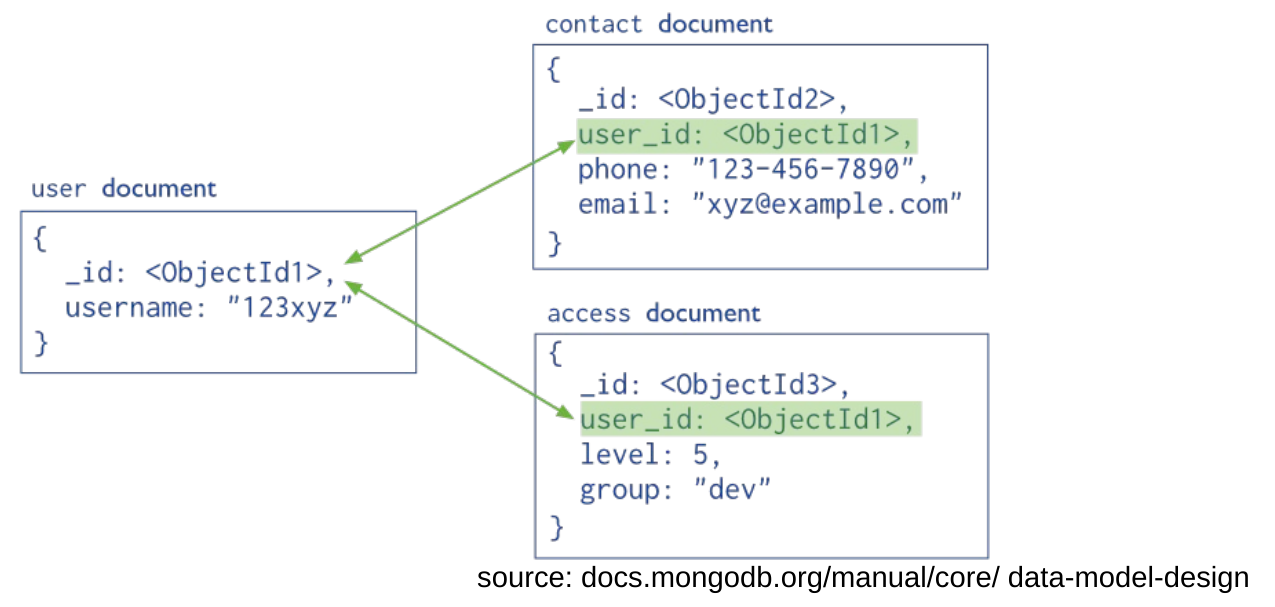
where have we seen this before?
foreign keys
Capturing Relationships in MongoDB (cont.)
- Two options (cont.):
- embed documents within other documents
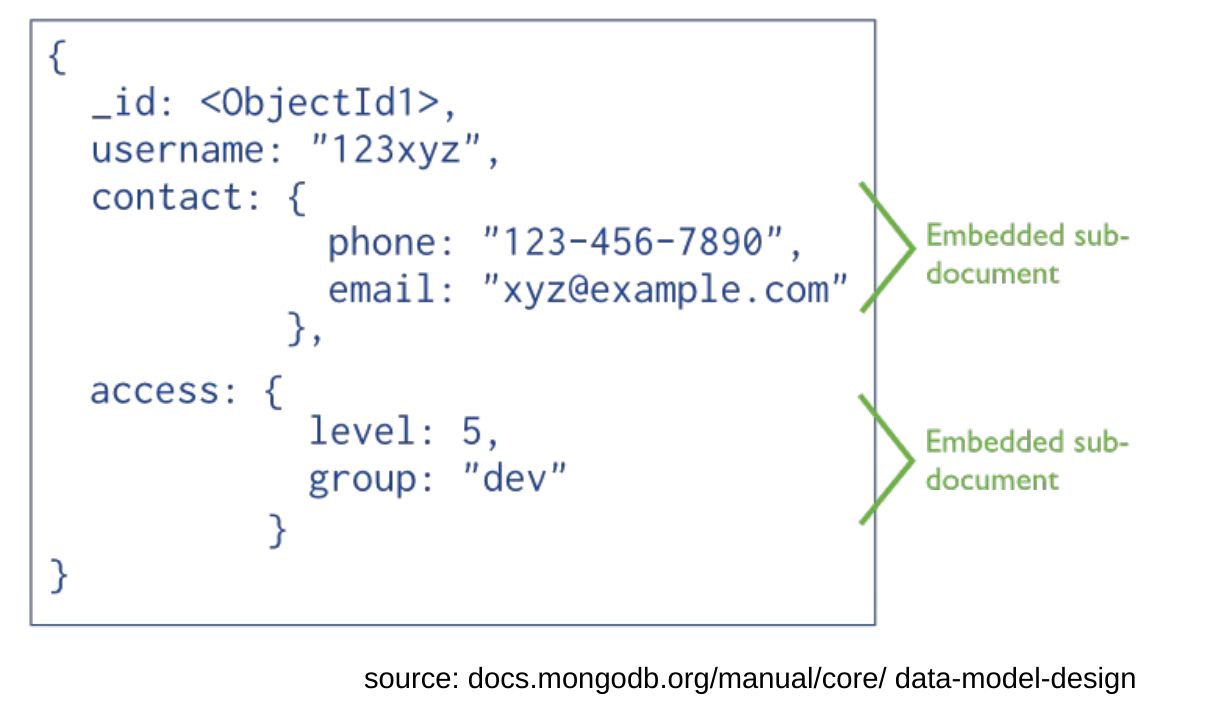
Factors Relevant to Data Modeling
- A given MongoDB query can only access a single collection.
- joins of documents are not supported
- need to issue multiple requests
➔ group together data that would otherwise need to be joined
- Atomicity is only provided for operations on a single document (and its embedded subdocuments).
➔ group together data that needs to be updated as part of a single logical operation (e.g., a balance transfer!)
➔ group together data items A and B if A’s current value affects whether/how you update B
Factors Relevant to Data Modeling (cont.)
- If an update makes a document bigger than the space allocated for it on disk, it may need to be relocated.
- slows down the update, and can cause disk fragmentation
- MongoDB adds padding to documents to reduce the need for relocation
➔ use references if embedded documents could lead to significant growth in the size of the document over time
Factors Relevant to Data Modeling
- Pluses and minuses of embedding (a partial list):
- + need to make fewer requests for a given logical operation
- + less network/disk I/O
- + enables atomic updates
- – duplication of data
- – possibility for inconsistencies between different copies of duplicated data
- – can lead documents to become very large, and to document relocation
- Pluses and minuses of using references:
- take the opposite of the pluses and minuses of the above!
- + allow you to capture more complicated relationships
- ones that would be modelled using graphs
Data Model for the Movie Database
- Recall our movie database.
Person(id, name, dob, pob)
Movie(id, name, year, rating, runtime, genre, earnings_rank)
Oscar(movie_id, person_id, type, year)
Actor(actor_id, movie_id) Director(director_id, movie_id)
- Three types of entities: movies, people, oscars
- Need to decide how we should capture the relationships
- between movies and actors
- between movies and directors
- between Oscars and the associated people and movies
Data Model for the Movie Database (cont.)
- Assumptions about the relationships:
- there are only one or two directors per movie
- there are approx. five actors associated with each movie
- the number of people associated with a given movie is fixed
- each Oscar has exactly one associated movie and at most one associated person
- Assumptions about the queries:
- Queries that involve both movies and people usually involve only the names of the people, not their other info.
common: Who directed Avatar?
common: Which movies did Tom Hanks act in?
less common: Which movies have actors from Boston?
- Queries that involve both Oscars and other entities usually involve only the name(s) of the person/movie.
Data Model for the Movie Database (cont.)
- Given our assumptions, we can take a hybrid approach that includes both references and embedding.
- Use three collections: movies, people, oscars
- Use references as follows:
- in movie documents, include ids of the actors and directors
- in oscar documents, include ids of the person and movie
- Whenever we refer to a person or movie, we also embed the associated entity’s name.
- allows us to satisfy common queries like Who acted in…?
- For less common queries that involve info. from multiple entities, use the references.
Data Model for the Movie Database (cont.)
- In addition, add two boolean fields to person documents:
- hasActed, hasDirected
- only include when true
- allows us to find all actors/directors that meet criteria involving their pob/dob
- Note that most per-entity state appears only once, in the main document for that entity.
- The only duplication is of people/movie names and ids.
Sample Movie Document
{ _id: "0499549",
  name: "Avatar",
  year: 2009,
  rating: "PG-13",
  runtime: 162,
  genre: "AVYS",
  earnings_rank: 1,
  actors: [ { id: "0000244",
              name: "Sigourney Weaver" },
            { id: "0002332",
              name: "Stephen Lang" },
            { id: "0735442",
              name: "Michelle Rodriguez" },
            { id: "0757855",
              name: "Zoe Saldana" },
            { id: "0941777",
              name: "Sam Worthington" } ],
  directors: [ { id: "0000116",
                 name: "James Cameron" } ] }